
Portal Clientes
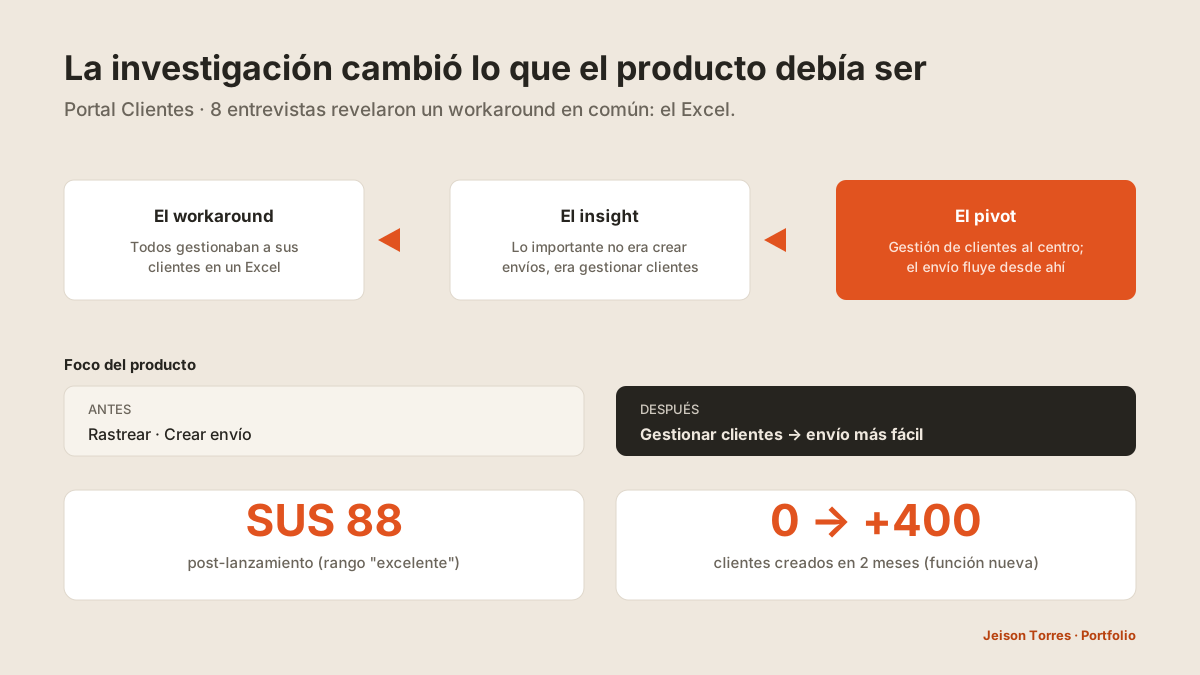
La investigación cambió el producto: de "crear envíos" a "gestionar clientes".
SUS 88 post-lanzamiento · adopción por datos del sistema: 0 → +400 clientes creados en 2 meses (función nacida de 8 entrevistas).

El problema
El producto optimizaba la tarea equivocada: el diseño original giraba en torno a rastrear y crear envíos. Nadie había ido a preguntar u observar si eso era realmente lo que el emprendedor más necesitaba.
Mi rol · equipo · organización
Propuse y lideré la iniciativa, diseñé las preguntas de entrevista, seleccioné participantes, moderé 4 de las 8 entrevistas, presenté los hallazgos a stakeholders y diseñé la nueva versión.
3 diseñadores en total; mis dos compañeros moderaron las otras 4 entrevistas, con roles rotados.
Los stakeholders revisaron los hallazgos y su retroalimentación descartó o avaló los planteamientos — una decisión compartida. Desarrollo implementó y lanzó.
Research
8 entrevistas a emprendedores, seleccionados con criterio del área comercial, con guion propio y roles rotados entre 3 diseñadores.
- Lo más importante para el emprendedor no era rastrear/crear un envío, sino gestionar a sus clientes.
- Todos usaban un Excel para guardar clientes, envíos, productos y direcciones — esa era la señal.
El Excel de cada emprendedor era, en la práctica, el brief del producto: si el portal permitía crear y gestionar clientes ahí mismo, hacer el envío se volvía más fácil. La gestión de clientes no era una función más — era la puerta de entrada al resto de la operación.
Insights
- El trabajo real no era el trabajo que el producto asumía.
- El Excel era un mapa de requisitos.
- Gestionar clientes destraba el envío: una función habilita a la otra.
Evidencia visual
Del Excel a gestionar clientes
Decisiones de diseño
Gestión comercial al centro
Crear y administrar clientes y productos, con favoritos, edición e historial de envíos por cliente.
Inicio con inteligencia de negocio
"Productos más vendidos" y "mejores clientes" al frente — el portal muestra al emprendedor su propio negocio.
Envíos integrados
Crear y gestionar envíos usando los clientes/productos ya cargados, con estados claros y seguimiento.
Resultados
Aprendizajes
- Investigar antes de optimizar.
- Los workarounds hablan: el Excel fue el mejor brief que pude recibir.
- Pivotar es una decisión de producto, no de UI.
Client Portal
Research changed the product: from "creating shipments" to "managing customers".
SUS 88 post-launch · adoption from system data: 0 → 400+ clients created in 2 months (feature born from 8 interviews).
The problem
The product was optimizing the wrong task: the original design revolved around tracking and creating shipments. Nobody had gone to ask or observe whether that was really what entrepreneurs needed most.
My role · team · organization
I proposed and led the initiative, wrote the interview questions, selected participants, moderated 4 of the 8 interviews, presented the findings to stakeholders and designed the new version.
3 designers in total; my two colleagues moderated the other 4 interviews, with rotating roles.
Stakeholders reviewed the findings and their feedback discarded or endorsed the proposals — a shared decision. Development implemented and launched.
Research
8 interviews with entrepreneurs, selected using criteria from the commercial area, with our own script and roles rotated among 3 designers.
- What mattered most to entrepreneurs was not tracking/creating a shipment, but managing their customers.
- They all used an Excel sheet to store customers, shipments, products and addresses — that was the signal.
Each entrepreneur's Excel was, in practice, the product brief: if the portal let them create and manage customers right there, making a shipment became easier. Customer management was not just another feature — it was the entry point to the rest of the operation.
Insights
- The real work was not the work the product assumed.
- The Excel was a map of requirements.
- Managing customers unlocks shipping: one feature enables the other.
Visual evidence
From Excel to managing customers
Design decisions
Commercial management at the center
Create and manage customers and products, with favorites, editing and shipment history per customer.
Home with business intelligence
"Best-selling products" and "best customers" up front — the portal shows entrepreneurs their own business.
Integrated shipments
Create and manage shipments using the customers/products already loaded, with clear statuses and tracking.
Results
Learnings
- Research before optimizing.
- Workarounds speak: the Excel was the best brief I could have received.
- Pivoting is a product decision, not a UI one.